Upload a room photo
Snap or upload a photo of your existing room — no measuring, no special app. The AI reads the floor area automatically.
Free AI flooring visualiser
Upload one photo of your room and our AI lays new flooring straight in — photo-realistic, in seconds. Free to try right here, no sign-up needed.
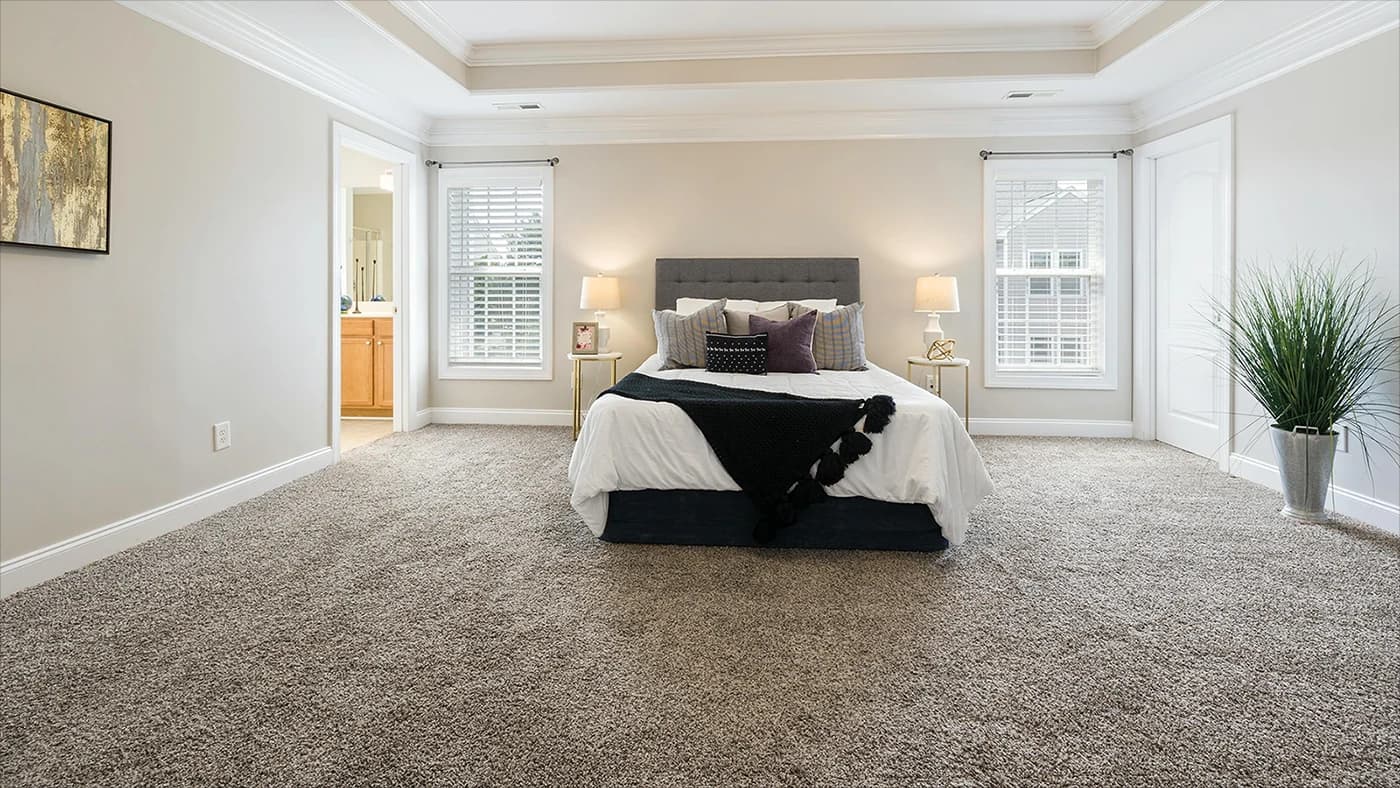
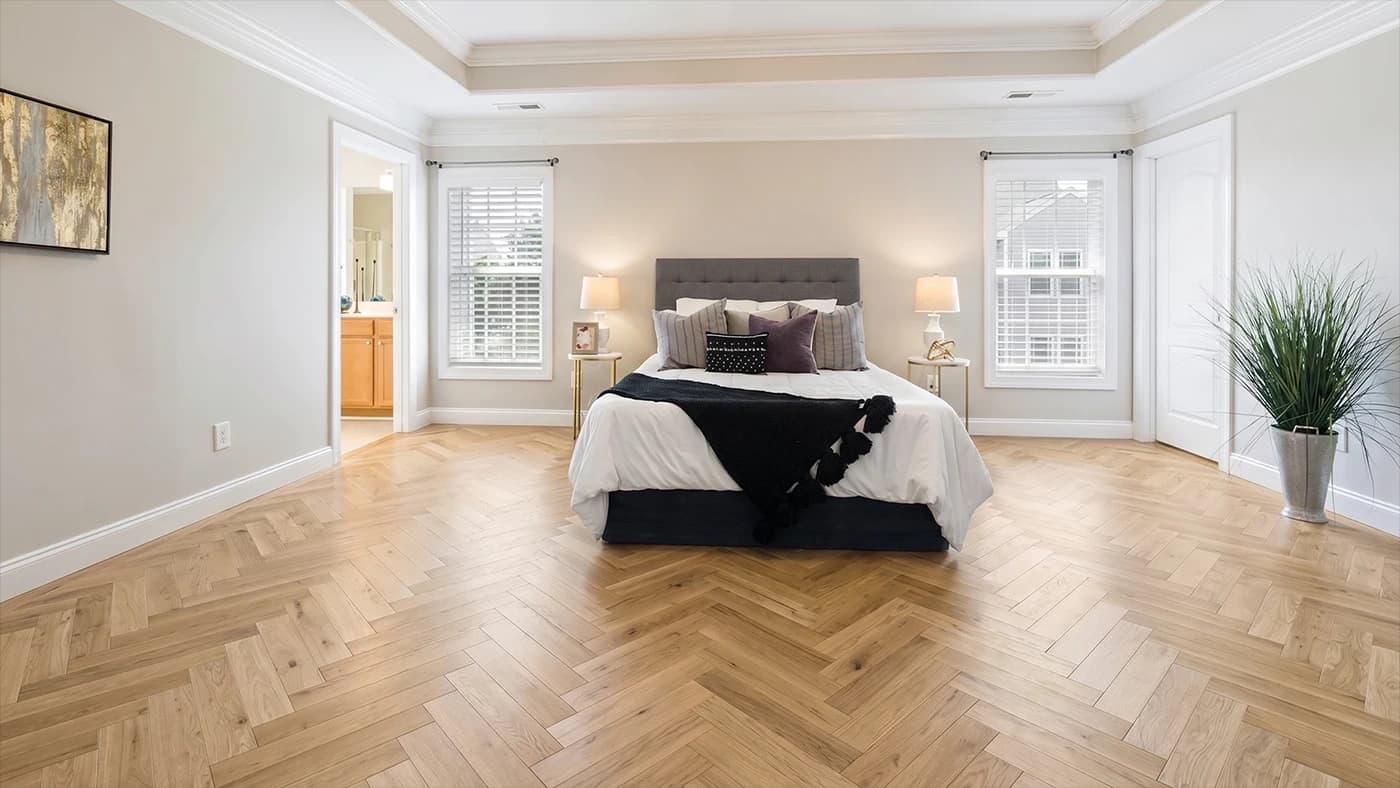
Real before & afters
Every pair is a real customer photo and the preview the visualiser made from it.
 Before
 After
After Before
 After
After Before
 After
After Before
 After
After Before
 After
After Before
 After
AfterHow this works
Why it matters
One plank or tile sample on the showroom floor, nowhere near your walls or furniture. You're left to imagine the rest — and it's hard to commit.
AI lays a real floor finish into a real photo of your room — under your lighting, against your walls, around your furniture.
The question shifts from 'will it look right?' to 'which one do I want?' — so you choose with confidence before you buy.
How it works
No measuring, no app, no waiting. Try it yourself in seconds, right on this page.
Snap or upload a photo of your existing room — no measuring, no special app. The AI reads the floor area automatically.
Choose a finish — oak, grey, walnut, herringbone, laminate, vinyl and tile. Every style ready to try.
The AI replaces the old floor with your chosen finish — matching the lighting, perspective and shadows so it looks like a real photo of your finished room.
Every floor you stock
Try every flooring style — and the harder a finish is to picture, the more the visualiser helps.
Pale, warm woods that make rooms feel bigger and brighter — the most-popular look, and hard to judge against dark walls without seeing it.
Cool greys and washed planks, from light to anthracite. Settles the 'is it too cold?' question before you commit.
Rich, dramatic dark woods. Nervous it'll shrink the room? See it in your own light first.
Herringbone and chevron parquet. Impossible to judge from a single plank, easy to picture once you see the pattern laid across the room.
Wood- and stone-effect laminate and luxury vinyl. Try the exact decor against your real walls, not a brochure.
Porcelain, marble-effect and natural stone tiles. Seeing the tile and grout across a whole floor is what turns 'maybe' into your top choice.
Why it’s different
Most flooring visualisers paste a flat texture onto a generic 3D room, on desktop only. This is the AI upgrade — and it's free to try.
Your floor gets dropped onto a stock room that looks nothing like yours, so the preview never feels like your home.
Sample overlays paint a flat texture over the floor and hope — no real lighting, perspective, edges or shadows.
Most incumbent tools won't run on a phone, so you can't try ideas from the sofa or in the showroom.
We work from a photo of your actual room, so the preview is genuinely yours — walls, furniture, light and all.
AI matches lighting, perspective, edges and shadows so the new floor sits naturally in the room.
Runs in any browser on any phone. Upload a photo and see a realistic result in seconds.
For flooring businesses
Love it? It's the same tool retailers and showrooms embed on their own site — showing their own range.
A common reason new floors disappoint is 'it didn't look how I imagined.' Seeing the real finish in your real room removes that surprise.
Swap three floors in seconds on your own room photo, side by side, instead of squinting at samples.
Embed this visualiser on your flooring product pages or run it on a showroom tablet. Visitors who try a floor are more likely to request a quote.
Herringbone and parquet are the hardest to imagine — so they're exactly where seeing it converts best.
Yes — you can try the AI flooring visualiser on this page for free, with no sign-up. Upload a photo of your room, pick a floor and see it in place in seconds. Free previews are limited per visitor; if you want more after that, extra previews start at £3 — but there's no obligation and no card details to try it.
It's a tool that shows new flooring in a real room. You upload a photo of your room, choose a finish, and the AI replaces the existing floor with your chosen one — keeping the lighting, perspective and shadows realistic so you see exactly how it will look before you buy.
The AI matches the perspective, lighting and shadows of your room photo, so the floor sits naturally underfoot. It's a true-to-life preview rather than a guaranteed colour match, so it's ideal for choosing a style with confidence before ordering a sample.
No. There's no measuring, no app to download and no special equipment. A single phone photo of your room is all the AI needs to lay the new floor.
Light and natural oak, greys and washed tones, walnut and dark woods, herringbone and parquet, laminate and luxury vinyl (LVT), plus tile, stone and porcelain. Retailers using VisualiseO load their own range so customers only see floors they can actually buy.
Yes — that's exactly who it's built for. VisualiseO is a widget you embed on your site or run as a showroom tablet, showing your own flooring range, with domain allow-listing and rate limits to keep it yours.
Embed the flooring visualiser on your site or showroom tablet, showing your own range.