Upload a kitchen photo
The customer snaps or uploads a photo of their existing kitchen — no measuring, no special app. The AI reads the worktop surface automatically.
Quartz worktop AI visualiser
Stop guessing from a tiny sample. Your customer uploads one photo of their kitchen and our AI drops your chosen quartz straight in — photo-realistic, in seconds.
Real before & afters
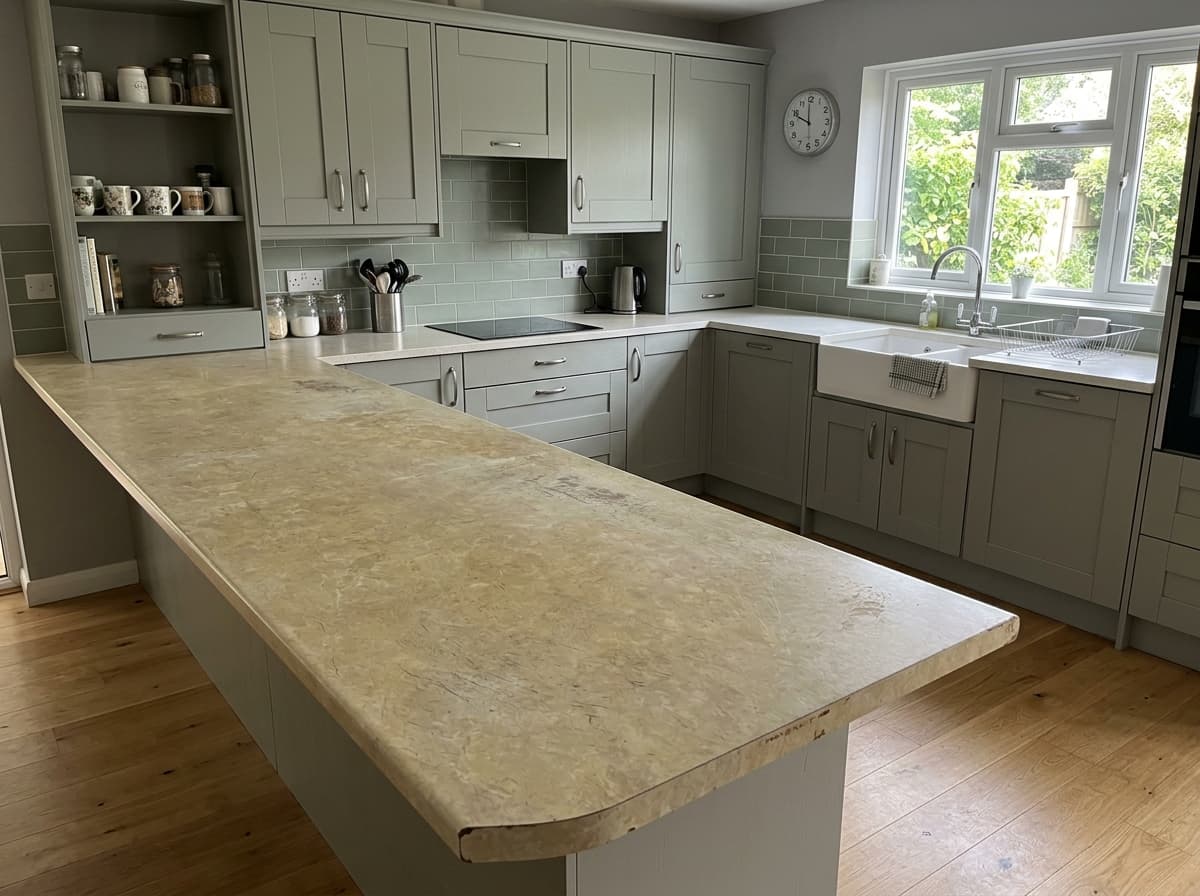
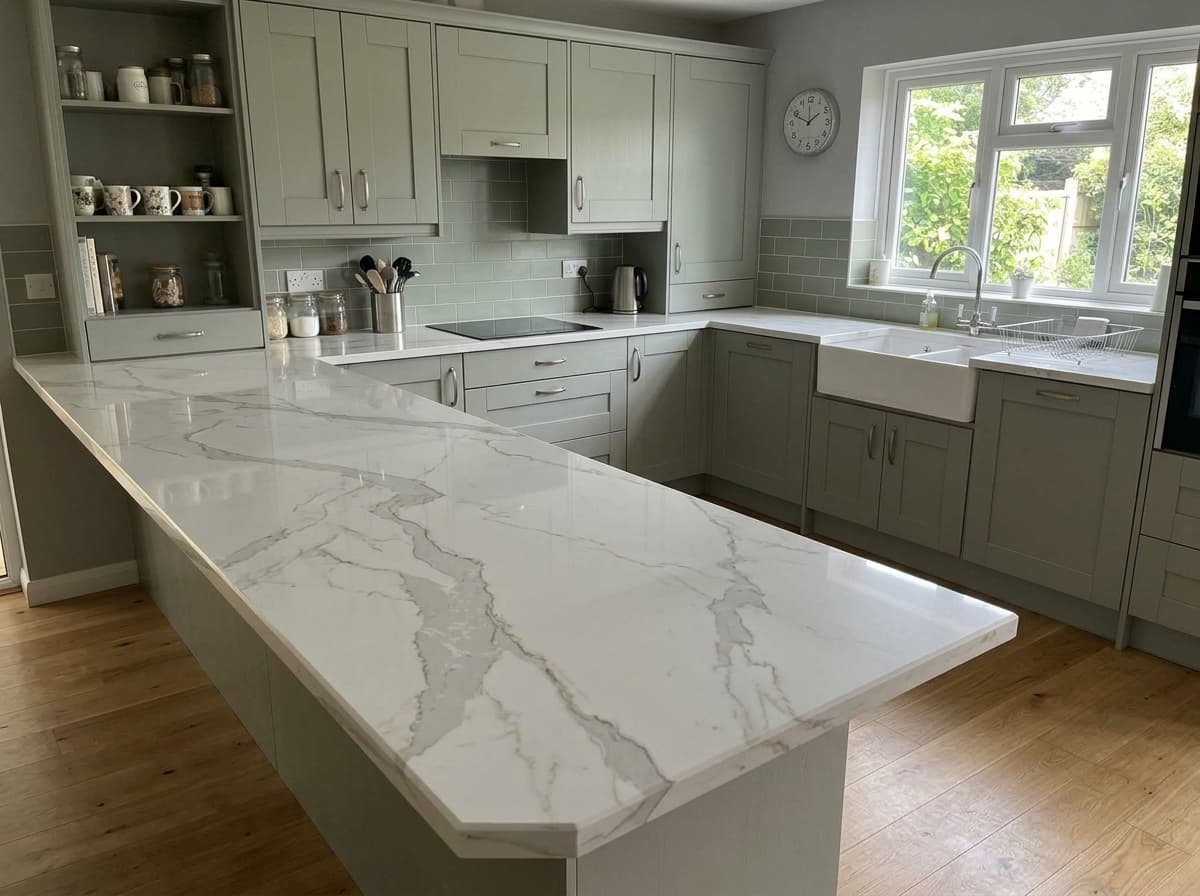
Every pair is a real customer photo and the preview the visualiser made from it.
 Before
 After
After Before
 After
After Before
 After
After Before
 After
After Before
 After
After Before
 After
AfterHow this works
Why it matters
A two-inch swatch, held under showroom lights, next to none of their cabinets. The customer is asked to imagine the rest — and hesitates.
AI places a real quartz finish into a real photo of their kitchen — under their lights, against their white, beside their splashback.
The question shifts from 'will it look right?' to 'which one do I want?' — and that's a far easier, faster sale to close.
How it works
No measuring, no app, no waiting for a designer. Customers do it themselves in seconds.
The customer snaps or uploads a photo of their existing kitchen — no measuring, no special app. The AI reads the worktop surface automatically.
They choose from your range — white quartz, grey, black, sparkle or marble-effect Calacatta. Every spec in your catalogue, ready to try.
The AI replaces the old worktop with the chosen quartz — matching the lighting, edges and reflections so it looks like a real photo of their finished kitchen.
Every finish you stock
Customers can try every quartz colour you stock — and the harder a finish is to picture, the more the visualiser sells it.
Marble-veined whites that make compact kitchens feel larger. The most-searched finish — and the hardest to imagine against dark units without seeing it.
Warm and cool greys, from light slate to charcoal and concrete-effect. Settles the 'is it too dark?' question before a customer commits to a slab.
Dramatic matt and polished blacks, including white-veined Nero Marquina. Customers are nervous about black — let them see it in their own light first.
Mirror-fleck sparkle that catches the light. Impossible to judge from a sample chip, effortless to sell once seen across a whole run.
Bold Calacatta and Statuario veining — the premium, high-margin look. Seeing the vein flow across an island is what turns 'maybe' into the top-tier slab.
Green, beige, brown, cream and blue tones for customers who want something beyond neutral. Try them against real cabinets instead of a brochure.
Why it’s different
Most worktop visualisers paste a flat colour onto a generic 3D kitchen, on desktop only. This is the AI upgrade.
Your colour gets dropped onto a stock kitchen that looks nothing like the customer's, so the preview never feels like theirs.
Swatch overlays paint a flat colour over the surface and hope — no real lighting, edges, upstands or reflections.
Most incumbent tools won't run on a phone, so customers can't try ideas from the sofa or hand the screen round the showroom.
We work from a photo of the customer's actual kitchen, so the preview is genuinely theirs — units, walls, light and all.
AI matches lighting, perspective, edges and reflections so the new worktop sits naturally in the room.
Runs in any browser on any phone. Load your own catalogue and customers see a realistic result in seconds.
For worktop businesses
Embed it on your website or run it on a showroom tablet. It shows your own quartz range — not ours.
A common reason worktops get rejected is 'it didn't look how I imagined.' Showing the real finish in the real kitchen removes that surprise.
Hand the iPad over, load their kitchen, swap three quartz colours in seconds. Indecision turns into a deposit.
Embed the visualiser on your worktop product pages. Visitors who try a colour are more likely to request a quote than visitors who just read specs.
Marble-effect and sparkle quartz carry the best margins. They're also the hardest to imagine — so they're exactly where seeing it converts best.
It's an AI tool that shows a quartz worktop in a real kitchen. Your visitor uploads a photo of their kitchen, chooses a quartz colour, and the AI replaces the existing worktop with their chosen quartz — keeping the lighting, edges and reflections realistic so they see exactly how it will look before they buy.
Visualiseo is a paid subscription for retailers and fabricators. You embed it on your website or run it on a showroom tablet, showing your own quartz range. Book a demo and we'll walk you through the plans and pricing that suit your volume.
The AI matches the perspective, lighting and reflections of your kitchen photo, so the quartz sits naturally on the units. It's a true-to-life preview rather than a guaranteed colour match, so it's ideal for choosing a style with confidence before ordering a sample slab.
Any quartz in the retailer's catalogue — white and Calacatta, greys, blacks and charcoals, sparkle quartz, and marble-effect designs. Fabricators load their own slab range so customers only see worktops they can actually buy.
No. There's no measuring, no app to download and no special equipment. A single phone photo of your kitchen is all the AI needs to place the new quartz worktop.
Most worktop visualisers paste a flat swatch onto a generic 3D kitchen and only run on desktop. This is a true AI visualiser: it works from a photo of your own kitchen, matches real lighting and reflections, runs on your phone, and shows results in seconds — a far more realistic preview than swatch-overlay tools.
Yes — that's exactly who it's built for. VisualiseO is a widget you embed on your site or run as a showroom tablet. It shows your own quartz range, with domain allow-listing and rate limits to keep it yours.
Embed the worktop visualiser on your site or showroom tablet, showing your own range.